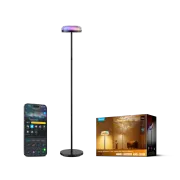
Govee Uplighter Review: The Smart Floor Lamp That Transforms Your Living Room
Looking for a way to dramatically change the atmosphere of your home with a single device? In this article, we take an in-depth look at the Govee Uplighter, a smart floor lamp that goes far beyond conventional lighting. From ripple effects on the ceiling to full Home Assistant integration via Matter, here’s why it could be the perfect addition to your connected home.
On YouTube I share more tutorials, hands-on tests and real smart home setups. Subscribe on YouTube
Related video on YouTube
VideoKey Features of the Govee Uplighter
The Govee Uplighter is more than just a lamp; it’s a versatile lighting system divided into three independent zones:
- White Lower Light: A functional light delivering up to 1000 lumens, perfect for reading or working. It lets you adjust the color temperature from cool to warm.
- Upper Ripple Light: Projects soothing effects onto the ceiling, ideal for movie nights or relaxing.
- Segmented Side Light: An RGBIC strip with multiple segments that you can control individually to create unique moods.
Assembly and Design
Govee stands out for its elegance. Assembly is incredibly simple:
- Height adjustment: The lamp is made up of tubes that screw together. You can remove sections to adjust the height if you have low ceilings.
- Premium finish: The joints between the tubes are virtually invisible, giving it the look of a single-piece design.
- Stability: The base is heavy, which helps prevent accidental tipping.
Setup and Govee App
The Govee Home app gives you full control. After a required firmware update, you’ll be able to:
- Control the 3 zones: Combine the lower light with the upper or side light (you can activate up to two zones at once).
- Scene Modes: From "Underwater" simulations to festive Christmas scenes.
- Artificial Intelligence: You can ask the app’s AI to generate an effect based on a description (e.g. "fairy forest").
- Music Sync: Thanks to its built-in microphone, the lamp reacts to the beat of your favorite songs.
Total Immersion with DreamView
If you already own other products from the brand, such as the Govee TV Backlight (Ambilight), you can use the DreamView. This lets you sync the lamp with the colors on your TV, extending the image across the whole living room and creating an impressive, immersive movie experience.
Home Assistant and Matter Integration
One of the biggest highlights for smart home enthusiasts is its compatibility with Matter.
- Pairing: It can be added directly to Home Assistant by scanning the Matter QR code.
- Control from HA: While Matter currently groups the color control of active zones, it still allows smooth management of power, brightness, and color temperature.
- Pro Tip: If you have pairing issues, press and hold the power button and press the selection button 4 times to enter pairing mode.
Where to buy
If you are interested in Govee Uplighter Floor Lamp, here are the available purchase options:
- Govee Uplighter Floor Lamp — Reviewed in the video: Official website · Amazon
Conclusion: Is the Govee Uplighter Worth It?
If you want a powerful lamp for daytime work and a creative ambiance tool for the evening, the Govee Uplighter is hard to beat. Its integration with the Govee ecosystem and platforms like Home Assistant makes it one of the best smart lighting options on the market today.
Want to see it in action?
Don’t miss the full visual breakdown and integration tutorial on my YouTube channel: Watch the Govee Uplighter video.