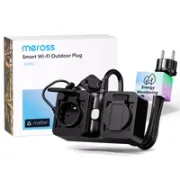
Meross MOP320 Review: Outdoor Dual Smart Plug for Home Assistant
If you want to control your pool, garden lighting or Christmas lights safely and accurately, the Meross MOP320 is one of the most robust outdoor smart plug options available. In this review, we break down its main features, how to integrate it locally with Home Assistant and how to use it in real automations.
On YouTube I share more tutorials, hands-on tests and real smart home setups. Subscribe on YouTube
Related video on YouTube
Video📦 Unboxing and technical specifications
The Meross MOP320 is not just another smart plug; it is designed to withstand outdoor conditions. The first thing that stands out when you hold it is how solid and robust it feels.
- Protection: IP44 rating, resistant to splashes and dust.
- Capacity: Supports up to 16A, around 3,680W, making it suitable for pool pumps or heaters.
- Connectivity: 2.4 GHz Wi-Fi and compatibility with the Matter standard.
- Design: Two independently controlled sockets with protective covers and a 1.5-meter cable.
- Energy monitoring: This is one of its strongest points: it measures power consumption individually for each of the two sockets.
💰 Get it here: Meross MOP320 price on AliExpress
🏷️ Meross discount coupon:HecM10on meross.com
📲 Initial setup and integration
Step 1: Official Meross app
To get started, the best option is to register it in the official Meross app to make sure the firmware is up to date. The process is simple:
- Download the Meross app and create an account.
- Put the plug into pairing mode; the LED will start flashing.
- Add the MOP320 model by following the on-screen steps.
Step 2: Matter or local integration? Be careful here ⚠️
Although the MOP320 supports Matter, this integration in Home Assistant currently has an important limitation: it does not show energy consumption data, only on and off control.
For that reason, my recommendation for Home Assistant users is to use the community Meross LAN integration, available through HACS. It allows 100% local control and access to all power consumption sensors.
🤖 Local integration in Home Assistant
For instant response and no cloud dependency:
- Install Meross LAN from HACS.
- Configure the device manually using its IP address. You can obtain the Meross cloud credentials the first time if needed.
- Done. You will have individual power (W), voltage (V) and current (A) sensors for each socket.
💡 Real automation: pool status
In my case, I use the MOP320 to manage pool maintenance. Thanks to individual power monitoring, we can know exactly what the pool motor is doing at any given moment.
Automation logic
I created a sensor or logic that determines the current state based on the watts being consumed:
- Less than 10W: Standby / Off.
- Between 10W and 70W: Filtering mode / low consumption.
- Between 70W and 600W: Bubble / jacuzzi mode.
- More than 600W: Heating water.
Visual notification on the Ulanzi Pixel Clock
To avoid accidentally leaving anything on, I send this information to my Ulanzi Pixel Clock, managed with Awtrix. If the pool is heating, the clock shows a fire icon and red text.
Recommended gear
Device used in this project: Meross MOP320. If you need it, here is where to find it:
- Meross MOP320 — Reviewed in the video: Official website (coupon: ) · Amazon · AliExpress
✅ Conclusions: pros and cons
Pros:
- Dual socket with independent control.
- Individual power monitoring, something that is hard to find in other models.
- Long 1.5-meter cable that makes installation easier.
- Excellent local integration through Meross LAN.
Cons:
- The Matter integration still does not report energy consumption in Home Assistant.
- The wall mounting system could be better; it is designed to hang from a screw.
If you want to see the installation process and the automations in action, do not miss the full video: Meross MOP320 review.
Was this article useful? If you have questions about configuring the energy consumption entities, leave them in the video comments.