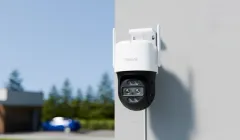
Reolink TrackMix WiFi 6: 4K PTZ Security Camera with Auto-Tracking and Zoom
If you're looking to take your home security to the next level, you've probably already come across Reolink. On its 16th anniversary, the brand has launched and improved some of its most iconic models. Today, we're taking a deep dive into the Reolink TrackMix WiFi 6, a camera that doesn't just monitor — it automatically tracks and zooms so not a single detail slips by. In this article, we'll break down why this PTZ (Pan-Tilt-Zoom) camera is quickly becoming a favorite among smart home enthusiasts and Home Assistant users.
On YouTube I share more tutorials, hands-on tests and real smart home setups. Subscribe on YouTube
Related video on YouTube
VideoKey Features: Dual Lens and 4K Resolution
The first thing that stands out about the Reolink TrackMix WiFi 6 is its dual-lens design. Unlike conventional cameras, this system gives you two simultaneous views:
- Wide-Angle View: For a panoramic look at the whole area (garden, garage, or driveway).
- Telephoto View: Focused on zoomed-in details.
Both operate at 4K UHD, delivering exceptional clarity day and night.
360° Smart Tracking with Auto-Zoom
The real "magic" of this model is its tracking capability. Thanks to its PTZ motor, it can rotate 355° horizontally and 90° vertically.
- Smart Detection: Distinguishes between people, vehicles, and pets, helping avoid false alarms caused by moving trees or shadows.
- Auto-Tracking: When it detects an intruder, the camera physically follows them and, at the same time, the telephoto lens applies automatic zoom to keep the subject in close view.
Installation and Setup: Now with WiFi 6
The version we're reviewing today includes WiFi 6, enabling a much more stable 4K video stream, with lower latency and greater range than previous versions.
Quick setup steps:
- Initial connection: It's recommended to connect it to the router first with an RJ45 cable for initial setup in the Reolink App.
- Local storage: It has a microSD card slot (up to 256GB), removing the need to pay monthly cloud subscriptions. It also works with Reolink NVRs and FTP/NAS servers.
- Mounting: It includes a template for marking wall holes, making the physical installation much easier.
Advanced Integration with Home Assistant
For those of us who follow HectorziN, we know that integration with Home Assistant is essential. Reolink is arguably the brand that integrates most seamlessly natively.
Thanks to Auto-discovery, Home Assistant will automatically detect the camera on your network. You'll be able to control:
- Turning on the LED spotlights.
- Manual siren activation.
- Motion sensors for people or vehicles to trigger automations.
- Controlling the motion motors (PTZ).
Tip for advanced users: RTSP and ONVIF
If you want to integrate the camera into systems like Frigate or simply access the video stream from other devices, remember to enable these protocols in the camera's network settings (via web or App):
# Example RTSP stream configuration in Home Assistant (if you don't use the official integration)
camera:
  - platform: ffmpeg
    name: Reolink TrackMix
    input: rtsp://admin:TU_CONTRASEÑA@IP_DE_TU_CAMARA:554/h264Preview_01_main
Where to buy
If you are interested in Reolink TrackMix WiFi, here are the available purchase options:
- Reolink TrackMix WiFi — Reviewed in the video: Official store · Amazon
Conclusion: Is It Worth It?
The Reolink TrackMix WiFi 6 is an investment in peace of mind. Its ability to distinguish targets and its automatic zoom put it well ahead of traditional fixed cameras. Plus, being "Subscription Free" (no fees) makes it extremely appealing in the long run.