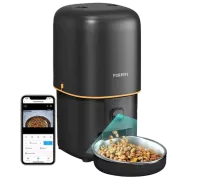
Automatic Cat and Small Dog Pet Feeder with Furpipi Tuya Smart Life Camera: Home Assistant Integration Guide
If you’re the kind of person who worries whether your pet has eaten while you’re away, smart feeders are the ultimate solution. But is one with a camera really worth it? And, more importantly for us, how does it integrate with Home Assistant? In this article, we take a look at Tuya/Smart Life’s smart dispenser and how to take its automation to the next level.
On YouTube I share more tutorials, hands-on tests and real smart home setups. Subscribe on YouTube
Related video on YouTube
VideoKey Features of the Smart Feeder for Cats, Small Dogs, and Pets
This model, available on AliExpress, stands out as an all-in-one solution for caring for your pet:
- Built-in HD camera: With night vision and two-way audio so you can talk to your cat or dog.
- Large capacity: Holds several days’ worth of dry food.
- Dual power supply: Runs on USB power but also accepts batteries as a backup in case the power goes out.
- Connectivity: Compatible with the Tuya and Smart Life apps.
Step-by-Step Installation and Setup
1. Assembly and Mobile App
Assembly is very simple: just fit the hopper and the stainless steel bowl together. For the initial setup:
- Download the Smart Life or Tuya Smart app.
- Put the feeder into pairing mode (by holding down the setup button).
- Add it to your 2.4GHz WiFi network. From there, you can schedule meal times and view the camera in real time.
2. Home Assistant Integration
This is where the magic happens. Once Tuya is integrated with Home Assistant, the feeder will appear as just another device.
- Available entities: You’ll be able to see the food sensor status (whether food is left or not) and, on some models, the activation history.
- Tip for manual feeding: If the integration doesn’t create a direct button for “dispense food,” you can create a script or scene in the Tuya app and then call it from Home Assistant as a
buttonor aswitch.
Useful Automations
Once it’s integrated, you can do things like:
- Empty hopper alert: Have Home Assistant send a notification to your phone (or announce it through Alexa/Google Home) when the sensor detects that food is running low.
- Vacation mode: If you have motion sensors, you can check that your cat has approached the bowl after a food dispense.
- Smart monitoring: Use the feeder’s camera as a camera entity in your HA Dashboard to keep an eye on the feeding area.
Where to buy
If you are interested in Furpipi Smart Pet Feeder 4L with 1080p Camera, here are the available purchase options:
- Furpipi Smart Pet Feeder 4L with 1080p Camera — Reviewed in the video: AliExpress
Conclusion: Is it worth it?
Absolutely. The peace of mind that comes from being able to see your pet (a small dog or a cat) eat and make sure the dispenser has worked is priceless. Plus, its integration with Home Assistant lets us centralize all the care of our home in one interface.
If you want to learn how to build integrations like this from scratch, don’t forget to sign up for my free Home Assistant course.