Complete Guide: Installing ZHA and Zigbee2MQTT in Home Assistant with SMLIGHT SLZB-07
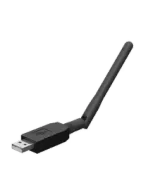
If you're looking to improve the stability and range of your Zigbee network in Home Assistant, choosing the right coordinator is essential. In this article, we'll walk through how to set up the SMLIGHT SLZB-07MG24 step by step, a compact and powerful USB dongle that stands out for its large memory capacity (RAM and Flash) and excellent electrical isolation. The best thing about this device is that, thanks to its design, it usually doesn't need the typical USB extension cable to avoid interference, and its size means you can plug it in alongside other USB devices without blocking nearby ports.
On YouTube I share more tutorials, hands-on tests and real smart home setups. Subscribe on YouTube

Related video on YouTube
Video1. Setup: Drivers and Firmware
Before connecting the device to Home Assistant, it's a good idea to make sure we have the necessary drivers installed and the firmware up to date.
Driver Installation (Windows)
If you use Home Assistant in a virtual machine on Windows, you'll need drivers for the Silicon Labs CP210x chip.
- Download the drivers from the official Silicon Labs website.
- Unzip the file and right-click the
.inffile to select Install.
Firmware Update
SMLIGHT makes this process much easier with a web tool:
- Go to SMLIGHT Flasher.
- Connect your dongle and select the exact model in the left menu.
- Click Update and follow the steps to install the latest version (e.g. v7.4.4).
2. Setup in Virtual Machines (VirtualBox)
If you use VirtualBox, you need to "pass through" the USB device from the host machine to the virtual one:
- Go to Settings > USB.
- Click the "Add Filter" icon and select the dongle (it will appear as Silicon Labs).
- Accept and restart the virtual machine if necessary.
3. Installing ZHA (Zigbee Home Automation)
ZHA is Home Assistant's native integration. It's the easiest option to get started.
- Automatic detection: When you connect the dongle, Home Assistant should show a "New device discovered" notification. Click Configure.
- Manual setup: If it doesn't appear, go to Settings > Devices & Services > Add Integration and search for Zigbee Home Automation.
- Select the corresponding serial port (usually
/dev/ttyUSB0or similar). - Choose "Keep the current network configuration" to finish.
4. Installing Zigbee2MQTT (Z2M)
For users looking for better compatibility with specific devices or external management outside the Home Assistant database, Zigbee2MQTT is the ideal choice.
Important: You can't have ZHA and Zigbee2MQTT running at the same time with the same dongle. If you configured ZHA, you need to remove it first.
Prerequisite: Mosquitto Broker
You must have the Mosquitto Broker add-on installed and a user configured in Home Assistant.
Step-by-step for Z2M:
- Go to Settings > Add-ons > Add-on Store.
- Click the three dots (top right) > Repositories.
- Add the URL:
https://github.com/zigbee2mqtt/hassio-zigbee2mqtt - Search for and install the Zigbee2MQTT add-on.
Zigbee2MQTT YAML Configuration
Open the add-on's Configuration tab and adapt the following code (changing your credentials):
mqtt:
  server: mqtt://localhost:1883
  user: tu_usuario_mqtt
  password: tu_password_mqtt
serial:
  port: /dev/serial/by-id/usb-Silicon_Labs_CP2102N_USB_to_UART_Bridge_Controller_... # Sustituye por tu ID real
  adapter: ezsp
Technical note: For the SLZB-07MG24 model (Silicon Labs chip), it's essential to add theadapter: ezspline (oremberin newer Z2M versions) so communication works correctly.
To find your exact port path, go to Settings > System > Hardware > All Hardware and search for "serial".
5. The Golden Tip for Stability
Even though this SLZB-07 model has excellent isolation, I always recommend keeping an eye on interference from 2.4GHz Wi-Fi. If you notice delays, try changing your Zigbee network channel (channel 25 is usually less crowded) or, despite that, use a short USB extension if your server has a lot of electronic components nearby.
And that's it! Your Zigbee network is now up and running with one of the best value-for-money coordinators on the market.
Want to see the process on video? You can watch the step-by-step tutorial here: How to Install ZHA and Zigbee2MQTT in HOME ASSISTANT on my channel HectorziN | Domótica y Home Assistant.
I hope this draft helps you for the HectorziN | Domótica y Home Assistant blog. Best of luck with the article!
Where to buy
If you are interested in SMLIGHT SLZB-07MG24, here are the available purchase options:
- SMLIGHT SLZB-07MG24 — Reviewed in the video: Amazon · Aliexpress